---
title: "Recording Browser Sessions"
description: "Record a timeline of screenshots, network requests, DOM snapshots, action groups — and, on supported engines, a video track — then view it in Record Player."
editUrl: https://github.com/VibiumDev/vibium/edit/main/docs/tutorials/recording.md
---
Record a timeline of screenshots, network requests, DOM snapshots, action groups — and, on supported engines, a video track — then view it in Record Player.
---
## What You'll Learn
How to capture a recording of a browser session and view it as an interactive timeline. For the video track's engine requirements and options, see the [Record Video](record-video.md) how-to guide.
---
## Quick Start
The fastest way to record a session — use `page.context` to access recording without creating an explicit context:
```javascript
const { browser } = require('vibium')
async function main() {
const bro = await browser.start()
const vibe = await bro.page()
await vibe.context.recording.start()
await vibe.go('https://var.parts')
await vibe.find({ text: 'Vibium Battery Pack' }).click()
await vibe.context.recording.stop()
await bro.stop()
}
main()
```
Sync JS
```javascript
const { browser } = require('vibium/sync')
const bro = browser.start()
const vibe = bro.page()
vibe.context.recording.start()
vibe.go('https://var.parts')
vibe.find({ text: 'Vibium Battery Pack' }).click()
vibe.context.recording.stop()
bro.stop()
```
Async Python
```python
import asyncio
from vibium.async_api import browser
async def main():
bro = await browser.start()
vibe = await bro.page()
await vibe.context.recording.start()
await vibe.go('https://var.parts')
await (await vibe.find(text='Vibium Battery Pack')).click()
await vibe.context.recording.stop()
await bro.stop()
asyncio.run(main())
```
Sync Python
```python
from vibium import browser
bro = browser.start()
vibe = bro.page()
vibe.context.recording.start()
vibe.go('https://var.parts')
vibe.find(text='Vibium Battery Pack').click()
vibe.context.recording.stop()
bro.stop()
```
Java
```java
import com.vibium.Vibium;
import com.vibium.types.SelectorOptions;
var bro = Vibium.start();
var vibe = bro.page();
vibe.context().recording().start();
vibe.go("https://var.parts");
vibe.find(new SelectorOptions().text("Vibium Battery Pack")).click();
vibe.context().recording().stop();
bro.stop();
```
CLI
```bash
vibium record start
vibium go https://var.parts
vibium find text "Vibium Battery Pack"
vibium click @e1
vibium record stop
```
MCP
Ask your AI assistant:
> "Start a recording, open var.parts and click the first product, then stop the recording"
The assistant drives the same operations through the `browser_record_start` and `browser_record_stop` tools.
---
## Where Your Recording Goes
The zip lands in your **current working directory**, under a timestamped
name so a rerun never overwrites the previous take:
```
Saved record-20260808-094123.zip (7 steps, 4s video)
```
The stop output always names the exact file. Three ways to control it:
- `name` seeds the stem: `start({ name: 'login' })` → `login-20260808-094123.zip`
- `path` (or `-o` in the CLI) picks the destination exactly — explicit paths overwrite
- `path: null` writes no file and returns the zip bytes instead
To view a recording, drop the zip onto [Record Player](https://player.vibium.dev):
a timeline of steps and screenshots, network activity, and — on Firefox 154+ —
a video track of the session. This is the video track from a recording of a
full checkout on [var.parts](https://var.parts), the demo shop used in the
examples below — the exact flow the [Action Groups](#action-groups) example drives:
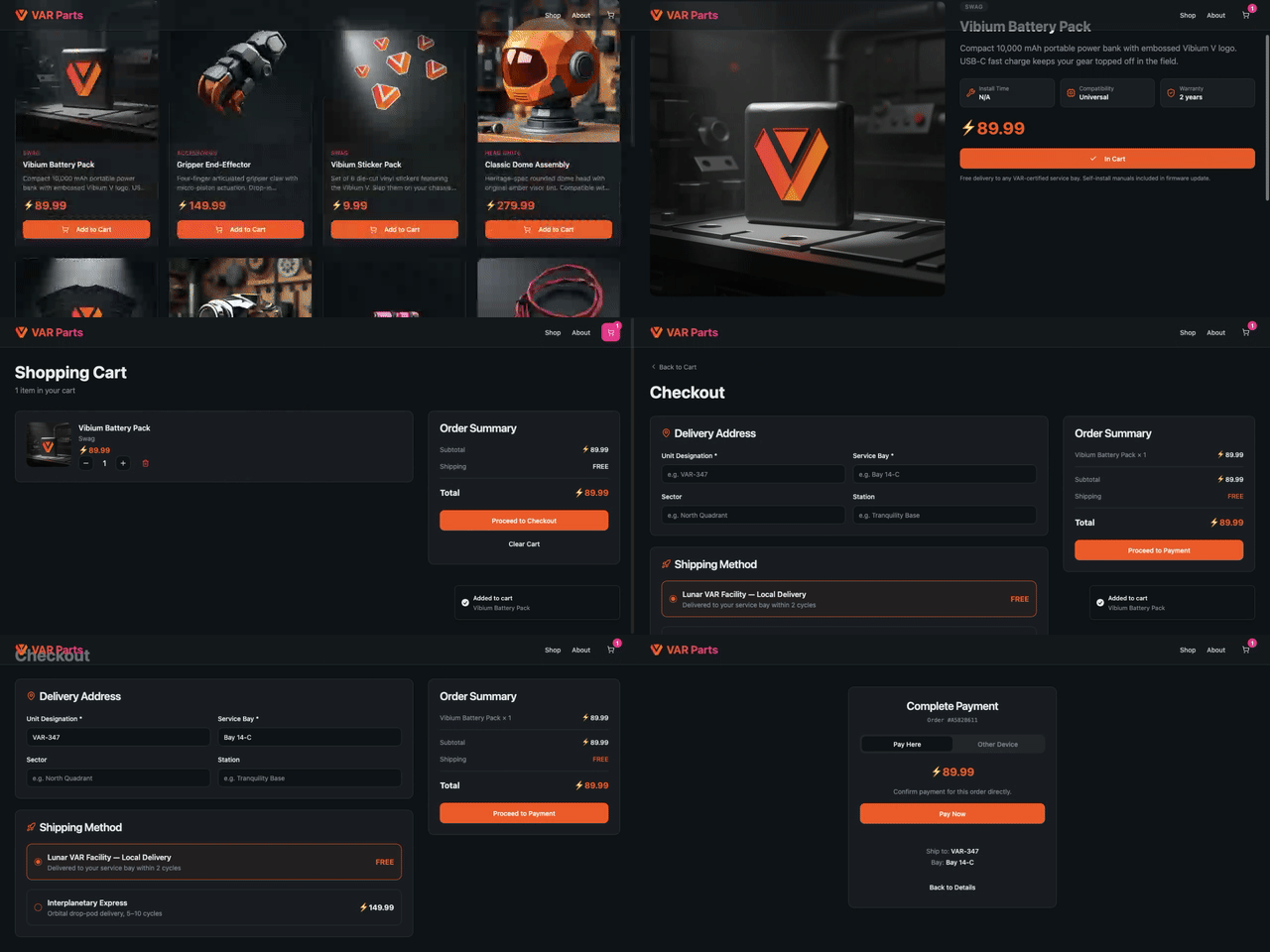
*(GIF preview — the [real video track](https://github.com/VibiumDev/vibium/blob/main/docs/images/recording-sample.webm) is an 8-second, 709 KB WebM, exactly as the browser encoded it inside the zip: 23 steps from product page to payment)*
---
## Basic Recording
Recording lives on `BrowserContext`, not `Page`. The Quick Start above uses `page.context` as a shortcut — under the hood, every page belongs to a context, and `page.context` gives you direct access to it. This is equivalent to creating an explicit context:
```javascript
const { browser } = require('vibium')
async function main() {
const bro = await browser.start()
const ctx = await bro.newContext()
const vibe = await ctx.newPage()
await ctx.recording.start({ name: 'my-session' })
await vibe.go('https://var.parts')
await vibe.find({ text: 'Vibium Battery Pack' }).click()
await ctx.recording.stop() // saved to my-session-.zip (the name seeds the stem)
await bro.stop()
}
main()
```
Sync JS
```javascript
const { browser } = require('vibium/sync')
const bro = browser.start()
const ctx = bro.newContext()
const vibe = ctx.newPage()
ctx.recording.start({ name: 'my-session' })
vibe.go('https://var.parts')
vibe.find({ text: 'Vibium Battery Pack' }).click()
ctx.recording.stop() // saved to my-session-.zip (the name seeds the stem)
bro.stop()
```
Async Python
```python
import asyncio
from vibium.async_api import browser
async def main():
bro = await browser.start()
ctx = await bro.new_context()
vibe = await ctx.new_page()
await ctx.recording.start(name='my-session')
await vibe.go('https://var.parts')
await (await vibe.find(text='Vibium Battery Pack')).click()
await ctx.recording.stop() # saved to my-session-.zip (the name seeds the stem)
await bro.stop()
asyncio.run(main())
```
Sync Python
```python
from vibium import browser
bro = browser.start()
ctx = bro.new_context()
vibe = ctx.new_page()
ctx.recording.start(name='my-session')
vibe.go('https://var.parts')
vibe.find(text='Vibium Battery Pack').click()
ctx.recording.stop() # saved to my-session-.zip (the name seeds the stem)
bro.stop()
```
Use an explicit context when you need multiple pages in the same recording, or when you want to configure context options (viewport, locale, etc.). Use `page.context` when you just want to record a single page quickly.
The recording zip lands in your working directory by default, under a timestamped name (`record-20260808-094123.zip`) so a rerun never overwrites the previous one. Declare a different destination at start, or override it at stop — the stop path wins:
```javascript
await ctx.recording.start({ path: 'runs/catalog.zip' })
// ...
await ctx.recording.stop({ path: 'runs/login-failed.zip' }) // override wins
```
Declaring the path at start also protects the recording: if the browser session ends before `stop()`, the recording auto-finalizes and delivers there. `stop()` returns a result describing what was delivered — `path`, `steps`, `durationMs`, and `videos` (or `videoUnavailable`). Pass `path: null` (`path=None`) at start for bytes-only capture: no file is written and the result carries the zip itself (`bytes` in JS, `data` in Python) instead of a path.
Screenshots are on by default. Add `snapshots` for a more complete recording (`screenshots: false` turns the filmstrip off):
```javascript
await ctx.recording.start({ snapshots: true })
```
- **screenshots** — captures the page after each action (on by default), creating a visual filmstrip.
- **snapshots** — captures the page around each action, so you can inspect it in the viewer.
To reduce recording size, use JPEG format with a lower quality setting:
```javascript
await ctx.recording.start({
format: 'jpeg',
quality: 0.3,
})
```
The default format is JPEG at 0.5 quality. Lowering `quality` produces smaller files — useful for long-running recordings or CI where file size matters.
---
## Video
On engines that support it (Firefox 154+, local browsers), a recording includes
a video track automatically — the browser encodes the viewport to WebM and the
file lands inside the zip next to the trace. You do not have to ask for it:
```javascript
await ctx.recording.start()
// ...
await ctx.recording.stop() // on Firefox the zip contains video/.webm
```
The `video` option has three settings:
- **omitted** — record video where the engine supports it, and carry on without
it where it doesn't. The stop result reports `videoUnavailable` with the
engine's reason.
- **`true`** — video is mandatory. `start()` fails with an explanatory error
rather than producing a recording that silently lacks it.
- **`false`** — no video track.
Video is sized to the viewport and captured at the engine's default frame rate.
To change either, pass an object instead of a boolean. Every field is optional:
```javascript
await ctx.recording.start({ video: { height: 480 } }) // scale down
await ctx.recording.start({ video: { frameRate: 10 } }) // smaller file
await ctx.recording.start({ video: { height: 480, frameRate: 10 } })
```
In Python the fields are snake_case:
```python
vibe.context.recording.start(video={"height": 480, "frame_rate": 10})
```
Java uses flat setters:
```java
vibe.context().recording().start(new RecordingOptions().videoHeight(480));
vibe.context().recording().start(new RecordingOptions().videoFrameRate(10));
vibe.context().recording().start(new RecordingOptions().videoHeight(480).videoFrameRate(10));
```
Two things to know about the size. **An object counts as asking for video**, the
same as `video: true` — you named specific output, so a recording that silently
skipped it would be a surprise. And **the size is a request**: the engine keeps
the viewport's aspect ratio and derives the other side, so `{ height: 480 }` on a
1280×720 viewport encodes 853×480, and asking for 640×480 there gets you 640×360.
The stop result reports what was actually encoded:
```javascript
const result = await ctx.recording.stop()
result.videos // [{ context, durationMs, width: 853, height: 480 }]
```
A session on a Vibium Station or a Roadie records the device's screen stream as
`video/.mp4`. The size and frame rate options do not apply there: the
stream is stored as it is.
Other remote browser connections (`--connect`) record every track except video,
and the stop result says why; for a remote host you control,
`video: { remote: 'keep' }` records anyway and leaves the file there. See the
[Record Video](record-video.md) guide.
Engine requirements, Firefox channel setup, and the zip layout are covered in [Record Video](record-video.md).
---
## Actions
Every vibium command (`click`, `fill`, `navigate`, etc.) is automatically recorded in the recording as an action marker. You don't need to wrap commands in groups to see them — they show up individually in the timeline.
```javascript
await ctx.recording.start()
await vibe.go('https://var.parts') // recorded as Page.navigate
await vibe.find({ text: 'Vibium Battery Pack' }).click() // recorded as Element.click
await vibe.find({ role: 'button', text: 'Add to Cart' }).click() // recorded as Element.click
await ctx.recording.stop()
```
Sync JS
```javascript
ctx.recording.start()
vibe.go('https://var.parts') // recorded as Page.navigate
vibe.find({ text: 'Vibium Battery Pack' }).click() // recorded as Element.click
vibe.find({ role: 'button', text: 'Add to Cart' }).click() // recorded as Element.click
ctx.recording.stop()
```
Async Python
```python
await ctx.recording.start()
await vibe.go('https://var.parts') # recorded as Page.navigate
await (await vibe.find(text='Vibium Battery Pack')).click() # recorded as Element.click
await (await vibe.find(role='button', text='Add to Cart')).click() # recorded as Element.click
await ctx.recording.stop()
```
Sync Python
```python
ctx.recording.start()
vibe.go('https://var.parts') # recorded as Page.navigate
vibe.find(text='Vibium Battery Pack').click() # recorded as Element.click
vibe.find(role='button', text='Add to Cart').click() # recorded as Element.click
ctx.recording.stop()
```
CLI
```bash
vibium record start
vibium go https://var.parts
vibium find text "Vibium Battery Pack"
vibium click @e1
vibium find role button --name "Add to Cart"
vibium click @e2
vibium record stop
```
Each `find` prints the ref to use next. Refs count up across finds on a page, so the second `find` here prints `@e2`.
To also record the raw BiDi protocol commands sent to the browser (e.g. `input.performActions`, `script.callFunction`), enable `bidi`:
```javascript
await ctx.recording.start({ bidi: true })
```
This is useful for debugging low-level protocol issues but makes recordings larger.
---
## Action Groups
Use `startGroup()` and `stopGroup()` to label sections of your recording. Groups show up as named spans in the timeline. This is the full checkout journey from the sample video above — browse, add to cart, and check out:
```javascript
await ctx.recording.start({ name: 'checkout' })
await vibe.go('https://var.parts')
await ctx.recording.startGroup('pick a part')
await vibe.find({ text: 'Vibium Battery Pack' }).click()
await vibe.find({ role: 'button', text: 'Add to Cart' }).click()
await ctx.recording.stopGroup()
await ctx.recording.startGroup('check out')
await vibe.find({ css: 'a[href="/cart"]' }).click() // the cart icon has no accessible name — CSS fallback
await vibe.find({ role: 'button', text: 'Proceed to Checkout' }).click()
await vibe.find({ label: 'Unit Designation' }).fill('VAR-347')
await vibe.find({ label: 'Service Bay' }).fill('Bay 14-C')
await vibe.find({ text: 'Lunar VAR Facility' }).click()
await vibe.find({ role: 'button', text: 'Proceed to Payment' }).click()
await ctx.recording.stopGroup()
await ctx.recording.stop() // checkout-.zip
```
Sync JS
```javascript
ctx.recording.start({ name: 'checkout' })
vibe.go('https://var.parts')
ctx.recording.startGroup('pick a part')
vibe.find({ text: 'Vibium Battery Pack' }).click()
vibe.find({ role: 'button', text: 'Add to Cart' }).click()
ctx.recording.stopGroup()
ctx.recording.startGroup('check out')
vibe.find({ css: 'a[href="/cart"]' }).click() // the cart icon has no accessible name — CSS fallback
vibe.find({ role: 'button', text: 'Proceed to Checkout' }).click()
vibe.find({ label: 'Unit Designation' }).fill('VAR-347')
vibe.find({ label: 'Service Bay' }).fill('Bay 14-C')
vibe.find({ text: 'Lunar VAR Facility' }).click()
vibe.find({ role: 'button', text: 'Proceed to Payment' }).click()
ctx.recording.stopGroup()
ctx.recording.stop() // checkout-.zip
```
Async Python
```python
await ctx.recording.start(name='checkout')
await vibe.go('https://var.parts')
await ctx.recording.start_group('pick a part')
await (await vibe.find(text='Vibium Battery Pack')).click()
await (await vibe.find(role='button', text='Add to Cart')).click()
await ctx.recording.stop_group()
await ctx.recording.start_group('check out')
await (await vibe.find(css='a[href="/cart"]')).click() # the cart icon has no accessible name — CSS fallback
await (await vibe.find(role='button', text='Proceed to Checkout')).click()
await (await vibe.find(label='Unit Designation')).fill('VAR-347')
await (await vibe.find(label='Service Bay')).fill('Bay 14-C')
await (await vibe.find(text='Lunar VAR Facility')).click()
await (await vibe.find(role='button', text='Proceed to Payment')).click()
await ctx.recording.stop_group()
await ctx.recording.stop() # checkout-.zip
```
Sync Python
```python
ctx.recording.start(name='checkout')
vibe.go('https://var.parts')
ctx.recording.start_group('pick a part')
vibe.find(text='Vibium Battery Pack').click()
vibe.find(role='button', text='Add to Cart').click()
ctx.recording.stop_group()
ctx.recording.start_group('check out')
vibe.find(css='a[href="/cart"]').click() # the cart icon has no accessible name — CSS fallback
vibe.find(role='button', text='Proceed to Checkout').click()
vibe.find(label='Unit Designation').fill('VAR-347')
vibe.find(label='Service Bay').fill('Bay 14-C')
vibe.find(text='Lunar VAR Facility').click()
vibe.find(role='button', text='Proceed to Payment').click()
ctx.recording.stop_group()
ctx.recording.stop() # checkout-.zip
```
CLI
```bash
vibium record start --name checkout
vibium go https://var.parts
vibium record group start 'pick a part'
vibium find text "Vibium Battery Pack"
vibium click @e1
vibium find role button --name "Add to Cart"
vibium click @e2
vibium record group stop
vibium record group start 'check out'
vibium click 'a[href="/cart"]' # the cart icon has no accessible name — CSS fallback
vibium find role button --name "Proceed to Checkout"
vibium click @e3
vibium find label "Unit Designation"
vibium fill @e4 "VAR-347"
vibium find label "Service Bay"
vibium fill @e5 "Bay 14-C"
vibium find text "Lunar VAR Facility"
vibium click @e6
vibium find role button --name "Proceed to Payment"
vibium click @e7
vibium record group stop
vibium record stop
# Saved checkout-20260808-094123.zip (23 steps, 8s video)
```
Groups can be nested:
```javascript
await ctx.recording.startGroup('checkout flow')
await ctx.recording.startGroup('shipping')
// ... fill shipping form
await ctx.recording.stopGroup()
await ctx.recording.startGroup('payment')
// ... fill payment form
await ctx.recording.stopGroup()
await ctx.recording.stopGroup()
```
---
## Chunks
Chunks split a long recording into segments without stopping the recording. Each chunk produces its own zip.
```javascript
await ctx.recording.start()
// First chunk: catalog
await vibe.go('https://var.parts')
await vibe.find({ text: 'Vibium Battery Pack' }).click()
const catalogZip = await ctx.recording.stopChunk({ path: 'catalog.zip' })
// Second chunk: about
await ctx.recording.startChunk({ name: 'about' })
await vibe.go('https://var.parts/about')
const aboutZip = await ctx.recording.stopChunk({ path: 'about.zip' })
// Final stop
await ctx.recording.stop()
```
Sync JS
```javascript
ctx.recording.start()
// First chunk: catalog
vibe.go('https://var.parts')
vibe.find({ text: 'Vibium Battery Pack' }).click()
ctx.recording.stopChunk({ path: 'catalog.zip' })
// Second chunk: about
ctx.recording.startChunk({ name: 'about' })
vibe.go('https://var.parts/about')
ctx.recording.stopChunk({ path: 'about.zip' })
// Final stop
ctx.recording.stop()
```
Async Python
```python
await ctx.recording.start()
# First chunk: catalog
await vibe.go('https://var.parts')
await (await vibe.find(text='Vibium Battery Pack')).click()
await ctx.recording.stop_chunk(path='catalog.zip')
# Second chunk: about
await ctx.recording.start_chunk(name='about')
await vibe.go('https://var.parts/about')
await ctx.recording.stop_chunk(path='about.zip')
# Final stop
await ctx.recording.stop()
```
Sync Python
```python
ctx.recording.start()
# First chunk: catalog
vibe.go('https://var.parts')
vibe.find(text='Vibium Battery Pack').click()
ctx.recording.stop_chunk(path='catalog.zip')
# Second chunk: about
ctx.recording.start_chunk(name='about')
vibe.go('https://var.parts/about')
ctx.recording.stop_chunk(path='about.zip')
# Final stop
ctx.recording.stop()
```
CLI
```bash
vibium record start
# First chunk: catalog
vibium go https://var.parts
vibium find text "Vibium Battery Pack"
vibium click @e1
vibium record chunk stop -o catalog.zip
# Second chunk: about
vibium record chunk start --name about
vibium go https://var.parts/about
vibium record chunk stop -o about.zip
# Final stop
vibium record stop
```
---
## Generate a Script from a Recording
A recording already carries the full action stream, so you can turn one
take into a starting script: click through a flow once, then let codegen
write the code.
**1. Record.** Drive the flow by hand, with `vibium run`, or from a client —
every command lands in the trace:
```bash
vibium record start
vibium go https://var.parts
vibium find text "Vibium Battery Pack"
vibium click @e1
vibium record stop -o take.zip
```
**2. Generate.** Emit JavaScript (default) or Python:
```bash
vibium codegen -i take.zip -o replay.mjs
vibium codegen -i take.zip --language python -o replay.py
```
The JavaScript script replays the recorded locators through the `vibium`
client:
```javascript
import { browser } from 'vibium';
const bro = await browser.start();
const vibe = await bro.page();
await vibe.go('https://var.parts');
await vibe.find({ text: 'Vibium Battery Pack' }).click();
await bro.stop();
```
Action groups from `startGroup()` become comments, failed actions are
skipped with a comment, and read-only queries (`text`, `isVisible`, …) are
dropped — the script replays what changed the page.
**3. Edit.** The script is a starting point, not a verbatim transcript.
Swap recorded one-off values for your own, add assertions, or pass options
like `browser.start({ headless: true })`.
**4. Run.**
```bash
npm install vibium && node replay.mjs
pip install vibium && python replay.py
```
The JavaScript output uses top-level `await`, so keep the `.mjs` extension
(or run it in a `"type": "module"` package). See the
[Codegen reference](../reference/codegen.md) for the full action mapping
and limitations.
---
## Viewing Recordings
Open a recording in [Record Player](https://player.vibium.dev):
1. Go to [player.vibium.dev](https://player.vibium.dev)
2. Drop your recording zip onto the page
The viewer shows:
- **Timeline** — scrub through screenshots frame by frame
- **Actions** — see group markers from `startGroup()`/`stopGroup()`
- **Network** — waterfall of all HTTP requests
- **Snapshots** — inspect the DOM at capture time
---
## CLI Usage
All recording features are available from the command line. The daemon is automatically started when needed.
```bash
# Start recording (screenshots are on by default)
vibium record start --snapshots --name my-session
# Do some work
vibium go https://var.parts
vibium find text "Vibium Battery Pack"
vibium click @e1
vibium find role button --name "Add to Cart"
vibium click @e2
# Action groups
vibium record group start 'pick a part'
vibium find text "Vibium Battery Pack"
vibium click @e3
vibium record group stop
# Chunks
vibium record chunk stop -o chunk1.zip
vibium record chunk start --name next-chunk
# Stop and save the recording
vibium record stop
```
---
## Reference
### start() Options
| Option | Type | Default | Description |
|--------|------|---------|-------------|
| `name` | string | `"record"` | Name for the recording; also seeds the default filename stem |
| `title` | string | — | Title shown in Record Player |
| `screenshots` | boolean | `true` | Capture a screenshot after each action |
| `snapshots` | boolean | `false` | Capture DOM snapshots around each action |
| `sources` | boolean | `false` | Reserved for future use |
| `bidi` | boolean | `false` | Record raw BiDi commands in the recording |
| `format` | `'jpeg'` \| `'png'` | `'jpeg'` | Screenshot image format |
| `quality` | number | `0.5` | JPEG quality 0.0–1.0 (ignored for PNG) |
| `video` | boolean \| object | — | Video track (Firefox 154+). Omitted: on when supported. `true`: required. `{width, height, frameRate}` to size it |
| `path` | string \| null | `record-.zip` | Where the zip lands at stop. `null`: bytes-only, no file |
### stop() Options
| Option | Type | Default | Description |
|--------|------|---------|-------------|
| `path` | string | start's `path` | Overrides the path declared at start |
| `upload` | boolean \| string | — | `true` also uploads the zip to the Record Store of the connected station; a URL names another station |
`stop()` returns a result object: `path`, `steps`, `durationMs`, `videos` (or `videoUnavailable`), and — for bytes-only recordings — the zip itself (`bytes` in JS, `data` in Python). `stopChunk()` returns the same shape; without a `path` the chunk comes back inline.
### CLI Flags
| Command | Flag | Description |
|---------|------|-------------|
| `record start` | `--screenshots` | Capture screenshots after each action (default on) |
| `record start` | `--snapshots` | Capture HTML snapshots |
| `record start` | `--bidi` | Record raw BiDi commands in the recording |
| `record start` | `--name NAME` | Name for the recording |
| `record start` | `--video` | Require video (`--video=false` to disable; omit for auto) |
| `record start` | `--video-size WxH` | Video dimensions (default: viewport) |
| `record start` | `--video-fps N` | Video frame rate |
| `record start` | `-o, --output PATH` | Where the zip lands at stop (default: `record-.zip`) |
| `record stop` | `-o, --output PATH` | Overrides the path declared at start |
| `record stop` | `--upload` | Also upload the zip to the Record Store of the station the session is connected through |
| `record stop` | `--upload-to URL` | Upload to this station instead, with the API key from `VIBIUM_CONNECT_API_KEY` |
### Java
Java mirrors the same options as flat fluent setters:
```java
vibe.context().recording().start(
new RecordingOptions().video(true).videoSize(1280, 720).path("run.zip"));
```
### MCP Tools
`browser_record_start`, `browser_record_stop`, `browser_record_start_group`, `browser_record_stop_group`, `browser_record_start_chunk`, `browser_record_stop_chunk`. The start tool takes the `start()` options as flat properties: `video`, `video_width`, `video_height`, `video_frame_rate`, `path`.
---
## Next Steps
- [Record Video](record-video.md) — the video track: engine support, Firefox channels, options
- [Recording Format](../reference/recording-format.md) — detailed spec of the zip structure
- [Codegen reference](../reference/codegen.md) — flags, action mapping, and limits for `vibium codegen`
- [Getting Started](../libraries/javascript/index.md) — first steps with Vibium