

Recording Browser Sessions
Record a timeline of screenshots, network requests, DOM snapshots, action groups — and, on supported engines, a video track — then view it in Record Player.
What You’ll Learn
Section titled “What You’ll Learn”How to capture a recording of a browser session and view it as an interactive timeline. For the video track’s engine requirements and options, see the Record Video how-to guide.
Quick Start
Section titled “Quick Start”The fastest way to record a session — use page.context to access recording without creating an explicit context:
const { browser } = require('vibium')
async function main() {  const bro = await browser.start()  const vibe = await bro.page()
  await vibe.context.recording.start()
  await vibe.go('https://var.parts')  await vibe.find({ text: 'Vibium Battery Pack' }).click()
  await vibe.context.recording.stop()  await bro.stop()}
main()
Sync JS
const { browser } = require('vibium/sync')
const bro = browser.start()const vibe = bro.page()
vibe.context.recording.start()
vibe.go('https://var.parts')vibe.find({ text: 'Vibium Battery Pack' }).click()
vibe.context.recording.stop()bro.stop()
Async Python
import asynciofrom vibium.async_api import browser
async def main():    bro = await browser.start()    vibe = await bro.page()
    await vibe.context.recording.start()
    await vibe.go('https://var.parts')    await (await vibe.find(text='Vibium Battery Pack')).click()
    await vibe.context.recording.stop()    await bro.stop()
asyncio.run(main())
Sync Python
from vibium import browser
bro = browser.start()vibe = bro.page()
vibe.context.recording.start()
vibe.go('https://var.parts')vibe.find(text='Vibium Battery Pack').click()
vibe.context.recording.stop()bro.stop()
Java
import com.vibium.Vibium;import com.vibium.types.SelectorOptions;
var bro = Vibium.start();var vibe = bro.page();
vibe.context().recording().start();
vibe.go("https://var.parts");vibe.find(new SelectorOptions().text("Vibium Battery Pack")).click();
vibe.context().recording().stop();
bro.stop();
CLI
vibium record start
vibium go https://var.partsvibium find text "Vibium Battery Pack"vibium click @e1
vibium record stop
MCP
Ask your AI assistant:
“Start a recording, open var.parts and click the first product, then stop the recording”
The assistant drives the same operations through the browser_record_start and browser_record_stop tools.
Where Your Recording Goes
Section titled “Where Your Recording Goes”The zip lands in your current working directory, under a timestamped name so a rerun never overwrites the previous take:
Saved record-20260808-094123.zip (7 steps, 4s video)The stop output always names the exact file. Three ways to control it:
nameseeds the stem:start({ name: 'login' })→login-20260808-094123.zippath(or-oin the CLI) picks the destination exactly — explicit paths overwritepath: nullwrites no file and returns the zip bytes instead
To view a recording, drop the zip onto Record Player: a timeline of steps and screenshots, network activity, and — on Firefox 154+ — a video track of the session. This is the video track from a recording of a full checkout on var.parts, the demo shop used in the examples below — the exact flow the Action Groups example drives:
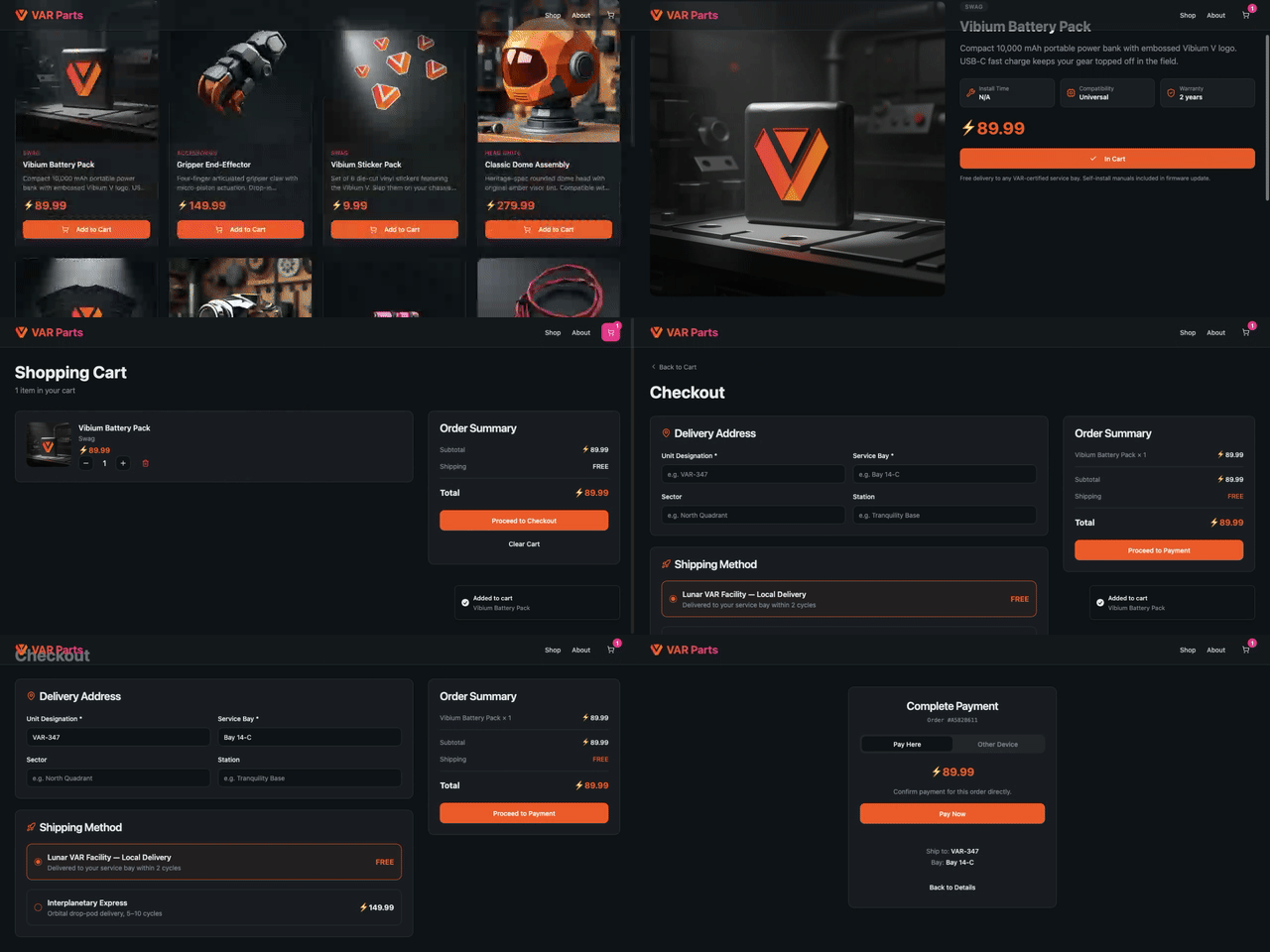
(GIF preview — the real video track is an 8-second, 709 KB WebM, exactly as the browser encoded it inside the zip: 23 steps from product page to payment)
Basic Recording
Section titled “Basic Recording”Recording lives on BrowserContext, not Page. The Quick Start above uses page.context as a shortcut — under the hood, every page belongs to a context, and page.context gives you direct access to it. This is equivalent to creating an explicit context:
const { browser } = require('vibium')
async function main() {  const bro = await browser.start()  const ctx = await bro.newContext()  const vibe = await ctx.newPage()
  await ctx.recording.start({ name: 'my-session' })
  await vibe.go('https://var.parts')  await vibe.find({ text: 'Vibium Battery Pack' }).click()
  await ctx.recording.stop()   // saved to my-session-<timestamp>.zip (the name seeds the stem)
  await bro.stop()}
main()
Sync JS
const { browser } = require('vibium/sync')
const bro = browser.start()const ctx = bro.newContext()const vibe = ctx.newPage()
ctx.recording.start({ name: 'my-session' })
vibe.go('https://var.parts')vibe.find({ text: 'Vibium Battery Pack' }).click()
ctx.recording.stop()   // saved to my-session-<timestamp>.zip (the name seeds the stem)
bro.stop()
Async Python
import asynciofrom vibium.async_api import browser
async def main():    bro = await browser.start()    ctx = await bro.new_context()    vibe = await ctx.new_page()
    await ctx.recording.start(name='my-session')
    await vibe.go('https://var.parts')    await (await vibe.find(text='Vibium Battery Pack')).click()
    await ctx.recording.stop()   # saved to my-session-<timestamp>.zip (the name seeds the stem)
    await bro.stop()
asyncio.run(main())
Sync Python
from vibium import browser
bro = browser.start()ctx = bro.new_context()vibe = ctx.new_page()
ctx.recording.start(name='my-session')
vibe.go('https://var.parts')vibe.find(text='Vibium Battery Pack').click()
ctx.recording.stop()   # saved to my-session-<timestamp>.zip (the name seeds the stem)
bro.stop()
Use an explicit context when you need multiple pages in the same recording, or when you want to configure context options (viewport, locale, etc.). Use page.context when you just want to record a single page quickly.
The recording zip lands in your working directory by default, under a timestamped name (record-20260808-094123.zip) so a rerun never overwrites the previous one. Declare a different destination at start, or override it at stop — the stop path wins:
await ctx.recording.start({ path: 'runs/catalog.zip' })// ...await ctx.recording.stop({ path: 'runs/login-failed.zip' }) // override winsDeclaring the path at start also protects the recording: if the browser session ends before stop(), the recording auto-finalizes and delivers there. stop() returns a result describing what was delivered — path, steps, durationMs, and videos (or videoUnavailable). Pass path: null (path=None) at start for bytes-only capture: no file is written and the result carries the zip itself (bytes in JS, data in Python) instead of a path.
Screenshots are on by default. Add snapshots for a more complete recording (screenshots: false turns the filmstrip off):
await ctx.recording.start({ snapshots: true })- screenshots — captures the page after each action (on by default), creating a visual filmstrip.
- snapshots — captures the page around each action, so you can inspect it in the viewer.
To reduce recording size, use JPEG format with a lower quality setting:
await ctx.recording.start({ format: 'jpeg', quality: 0.3,})The default format is JPEG at 0.5 quality. Lowering quality produces smaller files — useful for long-running recordings or CI where file size matters.
On engines that support it (Firefox 154+, local browsers), a recording includes a video track automatically — the browser encodes the viewport to WebM and the file lands inside the zip next to the trace. You do not have to ask for it:
await ctx.recording.start()// ...await ctx.recording.stop() // on Firefox the zip contains video/<context>.webmThe video option has three settings:
- omitted — record video where the engine supports it, and carry on without
it where it doesn’t. The stop result reports
videoUnavailablewith the engine’s reason. true— video is mandatory.start()fails with an explanatory error rather than producing a recording that silently lacks it.false— no video track.
Video is sized to the viewport and captured at the engine’s default frame rate. To change either, pass an object instead of a boolean. Every field is optional:
await ctx.recording.start({ video: { height: 480 } }) // scale downawait ctx.recording.start({ video: { frameRate: 10 } }) // smaller fileawait ctx.recording.start({ video: { height: 480, frameRate: 10 } })In Python the fields are snake_case:
vibe.context.recording.start(video={"height": 480, "frame_rate": 10})Java uses flat setters:
vibe.context().recording().start(new RecordingOptions().videoHeight(480));vibe.context().recording().start(new RecordingOptions().videoFrameRate(10));vibe.context().recording().start(new RecordingOptions().videoHeight(480).videoFrameRate(10));Two things to know about the size. An object counts as asking for video, the
same as video: true — you named specific output, so a recording that silently
skipped it would be a surprise. And the size is a request: the engine keeps
the viewport’s aspect ratio and derives the other side, so { height: 480 } on a
1280×720 viewport encodes 853×480, and asking for 640×480 there gets you 640×360.
The stop result reports what was actually encoded:
const result = await ctx.recording.stop()result.videos // [{ context, durationMs, width: 853, height: 480 }]A session on a Vibium Station or a Roadie records the device’s screen stream as
video/<context>.mp4. The size and frame rate options do not apply there: the
stream is stored as it is.
Other remote browser connections (--connect) record every track except video,
and the stop result says why; for a remote host you control,
video: { remote: 'keep' } records anyway and leaves the file there. See the
Record Video guide.
Engine requirements, Firefox channel setup, and the zip layout are covered in Record Video.
Actions
Section titled “Actions”Every vibium command (click, fill, navigate, etc.) is automatically recorded in the recording as an action marker. You don’t need to wrap commands in groups to see them — they show up individually in the timeline.
await ctx.recording.start()
await vibe.go('https://var.parts')   // recorded as Page.navigateawait vibe.find({ text: 'Vibium Battery Pack' }).click()   // recorded as Element.clickawait vibe.find({ role: 'button', text: 'Add to Cart' }).click()   // recorded as Element.click
await ctx.recording.stop()
Sync JS
ctx.recording.start()
vibe.go('https://var.parts')   // recorded as Page.navigatevibe.find({ text: 'Vibium Battery Pack' }).click()   // recorded as Element.clickvibe.find({ role: 'button', text: 'Add to Cart' }).click()   // recorded as Element.click
ctx.recording.stop()
Async Python
await ctx.recording.start()
await vibe.go('https://var.parts')   # recorded as Page.navigateawait (await vibe.find(text='Vibium Battery Pack')).click()   # recorded as Element.clickawait (await vibe.find(role='button', text='Add to Cart')).click()   # recorded as Element.click
await ctx.recording.stop()
Sync Python
ctx.recording.start()
vibe.go('https://var.parts')   # recorded as Page.navigatevibe.find(text='Vibium Battery Pack').click()   # recorded as Element.clickvibe.find(role='button', text='Add to Cart').click()   # recorded as Element.click
ctx.recording.stop()
CLI
vibium record start
vibium go https://var.partsvibium find text "Vibium Battery Pack"vibium click @e1vibium find role button --name "Add to Cart"vibium click @e2
vibium record stop
Each find prints the ref to use next. Refs count up across finds on a page, so the second find here prints @e2.
To also record the raw BiDi protocol commands sent to the browser (e.g. input.performActions, script.callFunction), enable bidi:
await ctx.recording.start({ bidi: true })This is useful for debugging low-level protocol issues but makes recordings larger.
Action Groups
Section titled “Action Groups”Use startGroup() and stopGroup() to label sections of your recording. Groups show up as named spans in the timeline. This is the full checkout journey from the sample video above — browse, add to cart, and check out:
await ctx.recording.start({ name: 'checkout' })await vibe.go('https://var.parts')
await ctx.recording.startGroup('pick a part')await vibe.find({ text: 'Vibium Battery Pack' }).click()await vibe.find({ role: 'button', text: 'Add to Cart' }).click()await ctx.recording.stopGroup()
await ctx.recording.startGroup('check out')await vibe.find({ css: 'a[href="/cart"]' }).click()   // the cart icon has no accessible name — CSS fallbackawait vibe.find({ role: 'button', text: 'Proceed to Checkout' }).click()await vibe.find({ label: 'Unit Designation' }).fill('VAR-347')await vibe.find({ label: 'Service Bay' }).fill('Bay 14-C')await vibe.find({ text: 'Lunar VAR Facility' }).click()await vibe.find({ role: 'button', text: 'Proceed to Payment' }).click()await ctx.recording.stopGroup()
await ctx.recording.stop()   // checkout-<timestamp>.zip
Sync JS
ctx.recording.start({ name: 'checkout' })vibe.go('https://var.parts')
ctx.recording.startGroup('pick a part')vibe.find({ text: 'Vibium Battery Pack' }).click()vibe.find({ role: 'button', text: 'Add to Cart' }).click()ctx.recording.stopGroup()
ctx.recording.startGroup('check out')vibe.find({ css: 'a[href="/cart"]' }).click()   // the cart icon has no accessible name — CSS fallbackvibe.find({ role: 'button', text: 'Proceed to Checkout' }).click()vibe.find({ label: 'Unit Designation' }).fill('VAR-347')vibe.find({ label: 'Service Bay' }).fill('Bay 14-C')vibe.find({ text: 'Lunar VAR Facility' }).click()vibe.find({ role: 'button', text: 'Proceed to Payment' }).click()ctx.recording.stopGroup()
ctx.recording.stop()   // checkout-<timestamp>.zip
Async Python
await ctx.recording.start(name='checkout')await vibe.go('https://var.parts')
await ctx.recording.start_group('pick a part')await (await vibe.find(text='Vibium Battery Pack')).click()await (await vibe.find(role='button', text='Add to Cart')).click()await ctx.recording.stop_group()
await ctx.recording.start_group('check out')await (await vibe.find(css='a[href="/cart"]')).click()  # the cart icon has no accessible name — CSS fallbackawait (await vibe.find(role='button', text='Proceed to Checkout')).click()await (await vibe.find(label='Unit Designation')).fill('VAR-347')await (await vibe.find(label='Service Bay')).fill('Bay 14-C')await (await vibe.find(text='Lunar VAR Facility')).click()await (await vibe.find(role='button', text='Proceed to Payment')).click()await ctx.recording.stop_group()
await ctx.recording.stop()  # checkout-<timestamp>.zip
Sync Python
ctx.recording.start(name='checkout')vibe.go('https://var.parts')
ctx.recording.start_group('pick a part')vibe.find(text='Vibium Battery Pack').click()vibe.find(role='button', text='Add to Cart').click()ctx.recording.stop_group()
ctx.recording.start_group('check out')vibe.find(css='a[href="/cart"]').click()  # the cart icon has no accessible name — CSS fallbackvibe.find(role='button', text='Proceed to Checkout').click()vibe.find(label='Unit Designation').fill('VAR-347')vibe.find(label='Service Bay').fill('Bay 14-C')vibe.find(text='Lunar VAR Facility').click()vibe.find(role='button', text='Proceed to Payment').click()ctx.recording.stop_group()
ctx.recording.stop()  # checkout-<timestamp>.zip
CLI
vibium record start --name checkoutvibium go https://var.parts
vibium record group start 'pick a part'vibium find text "Vibium Battery Pack"vibium click @e1vibium find role button --name "Add to Cart"vibium click @e2vibium record group stop
vibium record group start 'check out'vibium click 'a[href="/cart"]'   # the cart icon has no accessible name — CSS fallbackvibium find role button --name "Proceed to Checkout"vibium click @e3vibium find label "Unit Designation"vibium fill @e4 "VAR-347"vibium find label "Service Bay"vibium fill @e5 "Bay 14-C"vibium find text "Lunar VAR Facility"vibium click @e6vibium find role button --name "Proceed to Payment"vibium click @e7vibium record group stop
vibium record stop# Saved checkout-20260808-094123.zip (23 steps, 8s video)
Groups can be nested:
await ctx.recording.startGroup('checkout flow')
  await ctx.recording.startGroup('shipping')  // ... fill shipping form  await ctx.recording.stopGroup()
  await ctx.recording.startGroup('payment')  // ... fill payment form  await ctx.recording.stopGroup()
await ctx.recording.stopGroup()
Chunks
Section titled “Chunks”Chunks split a long recording into segments without stopping the recording. Each chunk produces its own zip.
await ctx.recording.start()
// First chunk: catalogawait vibe.go('https://var.parts')await vibe.find({ text: 'Vibium Battery Pack' }).click()const catalogZip = await ctx.recording.stopChunk({ path: 'catalog.zip' })
// Second chunk: aboutawait ctx.recording.startChunk({ name: 'about' })await vibe.go('https://var.parts/about')const aboutZip = await ctx.recording.stopChunk({ path: 'about.zip' })
// Final stopawait ctx.recording.stop()
Sync JS
ctx.recording.start()
// First chunk: catalogvibe.go('https://var.parts')vibe.find({ text: 'Vibium Battery Pack' }).click()ctx.recording.stopChunk({ path: 'catalog.zip' })
// Second chunk: aboutctx.recording.startChunk({ name: 'about' })vibe.go('https://var.parts/about')ctx.recording.stopChunk({ path: 'about.zip' })
// Final stopctx.recording.stop()
Async Python
await ctx.recording.start()
# First chunk: catalogawait vibe.go('https://var.parts')await (await vibe.find(text='Vibium Battery Pack')).click()await ctx.recording.stop_chunk(path='catalog.zip')
# Second chunk: aboutawait ctx.recording.start_chunk(name='about')await vibe.go('https://var.parts/about')await ctx.recording.stop_chunk(path='about.zip')
# Final stopawait ctx.recording.stop()
Sync Python
ctx.recording.start()
# First chunk: catalogvibe.go('https://var.parts')vibe.find(text='Vibium Battery Pack').click()ctx.recording.stop_chunk(path='catalog.zip')
# Second chunk: aboutctx.recording.start_chunk(name='about')vibe.go('https://var.parts/about')ctx.recording.stop_chunk(path='about.zip')
# Final stopctx.recording.stop()
CLI
vibium record start
# First chunk: catalogvibium go https://var.partsvibium find text "Vibium Battery Pack"vibium click @e1vibium record chunk stop -o catalog.zip
# Second chunk: aboutvibium record chunk start --name aboutvibium go https://var.parts/aboutvibium record chunk stop -o about.zip
# Final stopvibium record stop
Generate a Script from a Recording
Section titled “Generate a Script from a Recording”A recording already carries the full action stream, so you can turn one take into a starting script: click through a flow once, then let codegen write the code.
1. Record. Drive the flow by hand, with vibium run, or from a client —
every command lands in the trace:
vibium record startvibium go https://var.partsvibium find text "Vibium Battery Pack"vibium click @e1vibium record stop -o take.zip2. Generate. Emit JavaScript (default) or Python:
vibium codegen -i take.zip -o replay.mjsvibium codegen -i take.zip --language python -o replay.pyThe JavaScript script replays the recorded locators through the vibium
client:
import { browser } from 'vibium';
const bro = await browser.start();const vibe = await bro.page();
await vibe.go('https://var.parts');await vibe.find({ text: 'Vibium Battery Pack' }).click();
await bro.stop();
Action groups from startGroup() become comments, failed actions are
skipped with a comment, and read-only queries (text, isVisible, …) are
dropped — the script replays what changed the page.
3. Edit. The script is a starting point, not a verbatim transcript.
Swap recorded one-off values for your own, add assertions, or pass options
like browser.start({ headless: true }).
4. Run.
npm install vibium && node replay.mjspip install vibium && python replay.pyThe JavaScript output uses top-level await, so keep the .mjs extension
(or run it in a "type": "module" package). See the
Codegen reference for the full action mapping
and limitations.
Viewing Recordings
Section titled “Viewing Recordings”Open a recording in Record Player:
- Go to player.vibium.dev
- Drop your recording zip onto the page
The viewer shows:
- Timeline — scrub through screenshots frame by frame
- Actions — see group markers from
startGroup()/stopGroup() - Network — waterfall of all HTTP requests
- Snapshots — inspect the DOM at capture time
CLI Usage
Section titled “CLI Usage”All recording features are available from the command line. The daemon is automatically started when needed.
# Start recording (screenshots are on by default)vibium record start --snapshots --name my-session
# Do some workvibium go https://var.partsvibium find text "Vibium Battery Pack"vibium click @e1vibium find role button --name "Add to Cart"vibium click @e2
# Action groupsvibium record group start 'pick a part'vibium find text "Vibium Battery Pack"vibium click @e3vibium record group stop
# Chunksvibium record chunk stop -o chunk1.zipvibium record chunk start --name next-chunk
# Stop and save the recordingvibium record stop
Reference
Section titled “Reference”start() Options
Section titled “start() Options”| Option | Type | Default | Description |
|---|---|---|---|
name | string | "record" | Name for the recording; also seeds the default filename stem |
title | string | — | Title shown in Record Player |
screenshots | boolean | true | Capture a screenshot after each action |
snapshots | boolean | false | Capture DOM snapshots around each action |
sources | boolean | false | Reserved for future use |
bidi | boolean | false | Record raw BiDi commands in the recording |
format | 'jpeg' | 'png' | 'jpeg' | Screenshot image format |
quality | number | 0.5 | JPEG quality 0.0–1.0 (ignored for PNG) |
video | boolean | object | — | Video track (Firefox 154+). Omitted: on when supported. true: required. {width, height, frameRate} to size it |
path | string | null | record-<timestamp>.zip | Where the zip lands at stop. null: bytes-only, no file |
stop() Options
Section titled “stop() Options”| Option | Type | Default | Description |
|---|---|---|---|
path | string | start’s path | Overrides the path declared at start |
upload | boolean | string | — | true also uploads the zip to the Record Store of the connected station; a URL names another station |
stop() returns a result object: path, steps, durationMs, videos (or videoUnavailable), and — for bytes-only recordings — the zip itself (bytes in JS, data in Python). stopChunk() returns the same shape; without a path the chunk comes back inline.
CLI Flags
Section titled “CLI Flags”| Command | Flag | Description |
|---|---|---|
record start | --screenshots | Capture screenshots after each action (default on) |
record start | --snapshots | Capture HTML snapshots |
record start | --bidi | Record raw BiDi commands in the recording |
record start | --name NAME | Name for the recording |
record start | --video | Require video (--video=false to disable; omit for auto) |
record start | --video-size WxH | Video dimensions (default: viewport) |
record start | --video-fps N | Video frame rate |
record start | -o, --output PATH | Where the zip lands at stop (default: record-<timestamp>.zip) |
record stop | -o, --output PATH | Overrides the path declared at start |
record stop | --upload | Also upload the zip to the Record Store of the station the session is connected through |
record stop | --upload-to URL | Upload to this station instead, with the API key from VIBIUM_CONNECT_API_KEY |
Java mirrors the same options as flat fluent setters:
vibe.context().recording().start( new RecordingOptions().video(true).videoSize(1280, 720).path("run.zip"));MCP Tools
Section titled “MCP Tools”browser_record_start, browser_record_stop, browser_record_start_group, browser_record_stop_group, browser_record_start_chunk, browser_record_stop_chunk. The start tool takes the start() options as flat properties: video, video_width, video_height, video_frame_rate, path.
Next Steps
Section titled “Next Steps”- Record Video — the video track: engine support, Firefox channels, options
- Recording Format — detailed spec of the zip structure
- Codegen reference — flags, action mapping, and limits for
vibium codegen - Getting Started — first steps with Vibium